






Planning a cruise is different from planning an ordinary holiday. Your hotel, transport, dining, entertainment, and daily schedule are all tied to one moving ship, so small decisions can quickly become inconvenient once you are onboard. I found Royal Caribbean International most useful as a practical travel companion for keeping those decisions together rather than relying on scattered emails, paper schedules, and memory.
It is a free Travel & Local app from Royal Caribbean Cruises Ltd., aimed at people booking or taking a Royal Caribbean cruise. The app is available to everyone in terms of content rating, and its overall reception is strong: it holds a 4.6 average from around 143 thousand ratings, with more than 5 million installs. Those numbers do not replace personal experience, but they do suggest that it has become a familiar part of many passengers’ cruise routines.
My overall view is positive, with one important qualification: this is most valuable when you are actually preparing for or taking a Royal Caribbean sailing. It is not a general travel planner, a cruise comparison tool, or a substitute for researching destinations independently. Its strength comes from connecting the trip to the cruise line’s own information and onboard planning.
How the app fits into a real cruise
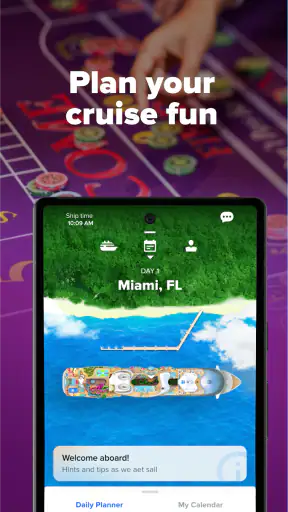
The first thing I noticed is that the app makes more sense when treated as a trip workspace than as a simple booking utility. Before departure, it can help organize the parts of the holiday that are easy to overlook. During the sailing, it becomes more useful because the ship’s schedule, activities, dining decisions, and day-to-day choices are all more immediate.
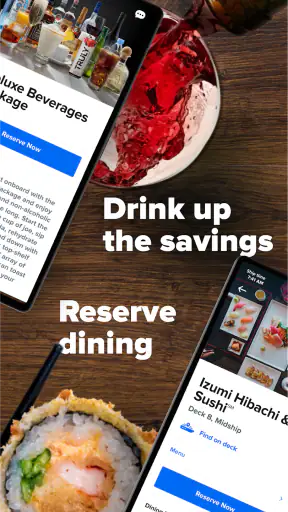
A realistic example is a sea day with several competing plans. I might want breakfast, a scheduled activity, time by the pool, a specialty dining reservation, and an evening show. Without a central place to check the day, I would be switching between printed material, messages, and whatever I remembered from the previous evening. The Royal Caribbean app gives that planning process a more direct home.
That matters especially for families or groups. People do not always want to do the same thing at the same time, and a cruise ship can be large enough that meeting arrangements become surprisingly important. Checking the day’s possibilities before leaving the cabin can reduce unnecessary walking and make it easier to agree on a time and place.
I also like the distinction between planning before the trip and managing it once onboard. A feature that looks merely convenient at home can become genuinely useful when the ship is busy, the internet connection is being used for other purposes, or plans are changing from hour to hour. The app is at its best when it reduces the number of small decisions you have to reconstruct manually.
Useful before departure
Before sailing, I would use it as a checklist rather than opening it only when I need a reservation. Cruise preparation often includes several separate tasks, and the danger is not usually that one task is difficult; it is that one gets forgotten. Keeping the trip in the same app makes it easier to return to the plan and see what still needs attention.
This is also where expectations should be realistic. The app is connected to a Royal Caribbean vacation, so its usefulness depends on having the relevant cruise information available to you. Someone browsing several cruise lines will still need other tools for comparing itineraries, evaluating ports, or deciding whether Royal Caribbean is the right operator. The app supports the trip you choose; it does not replace that research.
For first-time cruisers, that focus can be reassuring. There are many unfamiliar parts to a cruise, from timing meals to understanding what is happening on a sea day. Having the cruise-specific information in one place feels less intimidating than trying to interpret a general calendar or a collection of confirmation messages.
More valuable once onboard
Once the cruise begins, convenience becomes the main reason to keep using it. A ship’s routine can look simple from shore, but several activities may overlap, popular options may require advance attention, and the best plan can change after a long day in port. The app helps turn the ship’s schedule into something I can consult when making those decisions.
One practical habit is to check the next day before going to sleep. I can look at the port or sea-day rhythm, decide which activities matter most, and avoid trying to make every decision while rushing between locations. This is a small workflow, but it is one of the app’s strongest advantages because it changes the timing of planning, not just the place where information is displayed.
Another useful approach is to use it as a coordination tool for a group. Instead of making an ambitious plan that assumes everyone will stay together, I would choose one or two fixed meeting points and let the rest of the day remain flexible. The app is better for supporting that kind of realistic cruise rhythm than for creating a minute-by-minute itinerary that leaves no room for delays.
What the current version tells me about its development
The current version is 1.79.1, and the app has been available since August 10, 2017. That long presence matters because cruise software has to serve both people who plan carefully and passengers who only open it when they need an answer. A mature app should feel less like a novelty and more like an established layer of the travel experience, and that is the impression I get here.
I would not interpret the version number alone as proof that every part of the experience is equally polished. Cruise apps depend on trip-specific content, onboard systems, and changing schedules, so some of the quality comes from how accurately the current sailing is represented. Still, the continued evolution implied by the current release makes the app feel like an ongoing product rather than a static digital brochure.
The developer, Royal Caribbean Cruises Ltd., has a clear advantage over an independent travel app: it is close to the source of the cruise information. That can make the app more relevant for ship-specific planning than a generic calendar or notes application. It also creates a responsibility. If a passenger opens the app to make a decision onboard, the information needs to be timely and easy to understand.
For existing users, the main benefit of product evolution is not necessarily a dramatic new feature. It is a smoother path between booking, preparing, boarding, and living through the sailing. Improvements that reduce repeated searching or make the next step easier can have more practical value than flashy additions.
What changes mean for returning passengers
If you have used the app on an earlier cruise, the best way to judge a new version is to look for reduced friction in your own routine. Does it take fewer taps to find the day’s plan? Is it easier to move from a general schedule to a specific decision? Can you quickly return to information you checked earlier? Those are the changes that affect a real passenger more than a list of technical revisions.
I would also recommend updating before the trip rather than waiting until you are onboard. That is ordinary good preparation for any travel app, but it is especially sensible here because a cruise is not the easiest place to troubleshoot an app. I would sign in, check that my sailing appears correctly, and explore the main areas before departure. That way, I would know whether an issue is related to setup rather than discovering it when I am already trying to organize the day.
Returning passengers should avoid assuming that an old habit remains optimal. A printed schedule may still be useful as a backup, but the app can make it easier to adjust plans as the day develops. Conversely, I would not abandon all offline preparation. A phone battery, connectivity, or a moment of confusion can make a simple written note valuable, even when the app is working normally.
This balance is important: the app improves access to cruise information, but it does not remove the need for basic travel judgment. I would use it as the main planning aid while keeping essential booking details and meeting arrangements easy to find elsewhere.
Where it beats ordinary alternatives
A general calendar is good at showing appointments, but it does not understand the relationship between a cruise day, ship activities, dining choices, and port plans. A notes app is flexible, but everything has to be entered manually and can become outdated. Email is useful for confirmations, yet it is a poor tool for quickly deciding what to do next while walking around a ship.
This app’s advantage is context. It is designed around the Royal Caribbean experience, so the information is more likely to be organized in a way that matches the passenger’s actual questions. I do not have to build the entire cruise planner from scratch. That saves time and reduces the chance of overlooking something simply because it was stored in a different place.
There is a trade-off, though. A general travel app is better if I want one dashboard for flights, hotels, independent excursions, train tickets, and several cruise companies. The Royal Caribbean app is narrower by design. For a Royal Caribbean passenger, that narrowness is useful; for someone planning a mixed-brand holiday, it can mean maintaining another planning system alongside it.
Small workflows that make it more useful
My first tip is to separate “must do” plans from “nice if available” plans. A cruise can tempt passengers to fill every hour, but the app is more helpful when it supports priorities rather than creating pressure. I would identify the activities or reservations that matter most, then leave open space around them for meals, rest, and unexpected changes.
My second tip is to review the following day at a calm time, not only when an activity is about to begin. This lets me notice conflicts earlier and choose a sensible route through the day. It also helps with port days, when returning to the ship on time should take priority over squeezing in one more optional plan.
My third tip is for groups: agree on a shared rhythm instead of trying to stay together constantly. For example, a family might meet for one meal and one evening activity, while allowing different people to choose their own daytime plans. The app becomes a way to coordinate the fixed points without turning the entire holiday into a group negotiation.
A fourth useful habit is to check information directly before acting on an older assumption. Cruise schedules can be busy, and a plan made the previous day may no longer be the plan you want. I would treat the app as the place to recheck the current arrangement, while still allowing extra time for walking, queues, and the ordinary unpredictability of travel.
Limitations I would consider before installing it
The biggest limitation is its narrow purpose. If I am only researching cruises, comparing operators, or planning a land-based holiday, this is not the first app I would choose. It becomes worthwhile when my trip is connected to Royal Caribbean and I need cruise-specific organization.
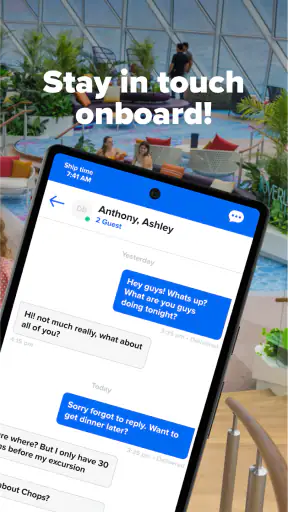
Another point is that an app cannot solve every onboard communication problem. A group may still need a clear meeting plan, and passengers should not assume that everyone will be looking at the same screen at the same time. The software can make coordination easier, but it cannot replace agreeing on practical details in advance.
There is also a learning curve for people who prefer paper. A passenger who dislikes using a phone for travel may find the app unnecessary, especially if they are comfortable with printed schedules and asking crew members for help. I would recommend it most strongly to people who already use their phone to manage reservations and daily plans.
Phone dependence is another reasonable concern. I would not rely on a single digital tool for every important detail. Before departure, I would keep key travel information accessible and make sure the phone is charged. That is not a criticism unique to this app, but it is relevant because its convenience can encourage people to put too much of the trip inside one device.
The app is also not a replacement for human assistance. A crew member may be better suited to answer a personal question, resolve a booking problem, or explain an unusual situation. The app is strongest for finding and organizing routine information; it is less suitable as the only channel for anything complicated or urgent.
Who should use it and who can skip it
I would recommend it to first-time Royal Caribbean cruisers who want one familiar place to prepare, families coordinating different interests, and passengers who like checking plans digitally rather than carrying printed material. It is particularly useful for people who want to make decisions the evening before instead of improvising every morning.
Frequent cruisers may appreciate it differently. They may already understand the basic rhythm of a sailing, so the value is less about learning how a cruise works and more about reducing repeated administrative effort. A returning passenger can use the app as a quick reference while keeping their attention on the holiday itself.
I would be less enthusiastic for someone who is still choosing between cruise lines. In that situation, independent travel research is more important than a cruise-line companion app. I would also suggest skipping it if you strongly prefer paper and do not expect to use a phone during the trip. Installing it without a willingness to check it before and during the sailing will not create much benefit.
For travelers combining a cruise with several unrelated bookings, a broader travel organizer may be better as the main dashboard. Even then, I would still consider using this app for the Royal Caribbean portion, because a general organizer is unlikely to provide the same cruise-specific context.
What I would watch in future updates
For future development, I would pay attention to how clearly the app handles changes to a passenger’s plan. The most valuable improvements would be the ones that make schedule adjustments easy to notice, reduce unnecessary searching, and keep the transition from pre-cruise preparation to onboard use smooth.
I would also watch the balance between information and clutter. Cruise passengers can have many possible activities, but more choices are not automatically better. The app should help me decide what matters without making every moment feel like another item to manage. Clear prioritization and a calm layout would be more useful than simply adding more material.
Another area worth watching is group planning. Families and friends often need shared decisions, but not everyone wants identical schedules. Tools that support flexible coordination would fit real cruise behavior better than features that assume the whole group moves together all day.
Finally, I would look for continued attention to reliability and clarity. A travel app earns trust when the information is easy to find at the moment it matters. That is especially true onboard, where passengers may be tired, hurried, or unfamiliar with the ship. Product evolution should be measured by how confidently a passenger can act, not just by how many screens the app contains.
My recommendation
Royal Caribbean International is a focused, practical companion for a Royal Caribbean cruise. I would not install it expecting a complete travel marketplace or a universal holiday planner. I would install it to bring cruise preparation and onboard decisions into one place, then use it deliberately rather than constantly.
Its free price removes the main barrier to trying it, and the Everyone rating makes it suitable for a wide range of passengers. The current 1.79.1 version reflects an established product that has been available since 2017, while its strong user reception and broad install base show that it is already part of many travelers’ cruise routines.
My advice is simple: prepare with it before departure, check the next day in advance, use it to coordinate key moments, and keep a modest backup for essential details. With that approach, it can remove a surprising amount of small travel friction. If you are not taking a Royal Caribbean cruise, however, its specialized design is more limitation than advantage, and a broader travel planner will probably serve you better.


